🗑️ Section 06: Delete and Clear-All Controls
📝 Summary
In this section, you will add the controls for removing books. You will write one click listener that removes a single row when a delete button is clicked, and another click listener that clears the entire list when the Clear All button is clicked.
By the end of this section, your app will handle both remove actions and keep the page display and in-memory data synchronized after each action.
✅ Checklist
- [ ] Open
app.jsin your project root. - [ ] Find your Section 05 submit listener block.
- [ ] Type the Section 06 JavaScript code by hand directly below the submit listener.
- [ ] Add the click listener on
#book-listfor row delete actions. - [ ] Add the click listener on
#clear-booksfor clear-all actions. - [ ] Ensure each action updates memory, display count, Add button state, and alert feedback.
- [ ] Make sure "No books to clear" appears when the list is already empty.
🎓 Core Concepts (HTML and CSS)
This section does not add new HTML or CSS lines, but it uses your existing HTML IDs and CSS classes in important ways. The table body ID (#book-list) becomes the area where you listen for delete clicks, and the button ID (#clear-books) becomes a control for clearing everything at once.
You are also using a core JavaScript pattern called event delegation. Event delegation means you listen for clicks on a parent element (the table body), then check which child element was actually clicked. This is useful because your book rows are created dynamically after page load. If you tried to attach a click listener to each future row manually, your code would be harder to manage.
Another key idea is state synchronization. After every delete action, your app must update both what users see and what your array stores. If only one side updates, your app becomes unreliable. In this section, each listener updates memory, updates visible counts, and shows feedback so the interface stays trustworthy.
💻 Code to Write
HTML (index.html)
No HTML changes in this section. Keep your index.html from Section 02 exactly as it is.
CSS (This Section)
No CSS changes in this section. Continue using the Bootstrap and Font Awesome setup already in your HTML.
JavaScript (app.js)
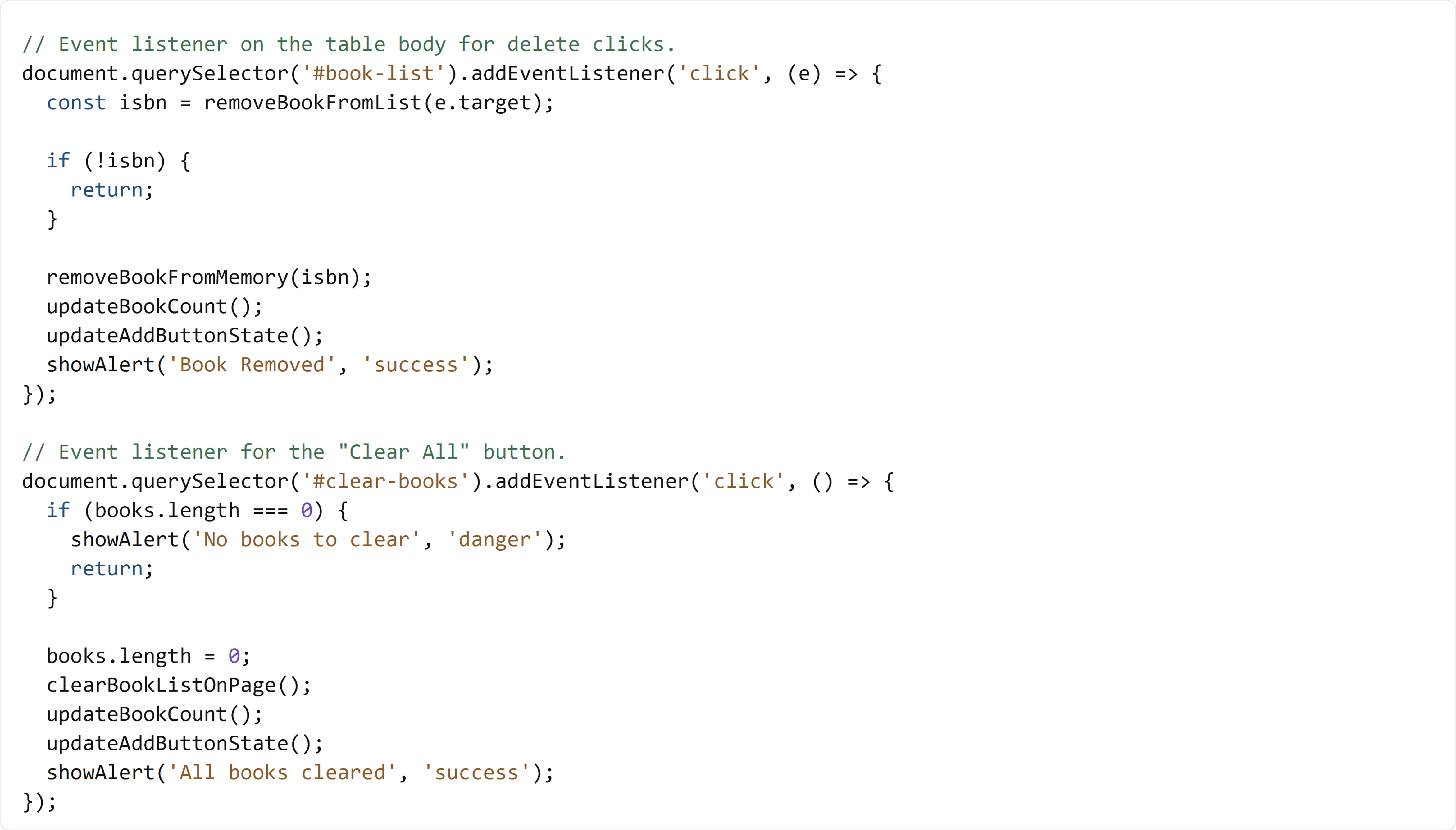
Open app.js, then type the code below by hand directly under your Section 05 submit listener.
In the next section, you will review the complete final app.js flow and confirm your full script matches the finished project version.
🧠 Detailed Key Concepts
The first listener attaches to #book-list, not to each individual delete button. This is event delegation. The function receives the event object e, and e.target tells you exactly which element was clicked. You pass that target into removeBookFromList(e.target), which either removes a row and returns its ISBN, or returns null if the click was not on a delete button.
The line if (!isbn) { return; } is an early exit. An early exit means "stop this function now because there is nothing to do." This prevents accidental logic from running when someone clicks somewhere in the row area that is not a delete action. If an ISBN exists, then you know a row was actually removed, and it is safe to remove that same ISBN from memory.
After a valid delete, your app runs a consistent update sequence: removeBookFromMemory(isbn) updates data, updateBookCount() refreshes the visible total, updateAddButtonState() re-checks button rules, and showAlert(...) gives user feedback. This pattern of grouped updates helps keep your app predictable.
The Clear All listener follows a similar idea. It first checks books.length === 0. The length property tells you how many books are currently in memory. If the value is zero, there is nothing to clear, so your app shows a warning alert and exits early with return.
If books exist, books.length = 0 empties the array immediately. Then clearBookListOnPage() removes all visible rows from the table. Finally, the count, button state, and success alert are updated. This creates a complete clear-all action where data and interface stay in sync from start to finish.